In today’s digital world, protecting your online privacy and data security has become more important than ever. Whether you are looking to secure your connection on public Wi-Fi or enjoy a more stable browsing experience, SSH tunneling and V2Ray/XRAY protocols are among the most effective professional solutions available.
At Diden Store, we provide premium SSH and XRAY accounts designed with robust encryption standards to ensure your digital footprint remains private and secure.
Understanding SSH and V2Ray/XRAY Protocols
Before diving into the setup, it is essential to understand the technology behind these secure tunnels:
SSH (Secure Shell)
Creates a direct encrypted tunnel between your device and a remote server. It is widely used for secure remote management and basic data tunneling.
V2Ray / XRAY
A sophisticated platform supporting advanced protocols like VLESS, VMESS and Trojan for superior stealth and speed.
Why Use These Tools?
These protocols encapsulate your internet traffic within a secure private tunnel, effectively masking your real IP address and protecting your sensitive data from potential eavesdropping.
1. How to Set Up an SSH Account
Desktop (Windows/macOS)
Using a client like Bitvise SSH Client is the most stable method for desktop users:
- Enter your SSH Hostname, Port 22, and your Diden Store credentials.
- Navigate to the Services tab.
- Enable SOCKS5 Dynamic Port Forwarding (usually on port 1080).
- Configure your browser or system proxy to
127.0.0.1:1080.
Mobile (Android/iOS)
For mobile terminal enthusiasts, Termux offers great flexibility:
- Install the terminal application on your device.
- Initialize a new connection using your assigned SSH details.
- Establish the tunnel and verify your connection status.
2. How to Set Up V2Ray / XRAY
HTTP Custom: The All-in-One Solution
For users seeking a streamlined experience, HTTP Custom is a versatile tool that supports SSH, VMess, VLESS, and Trojan protocols in a single interface.
Key Features:
- Multi-Protocol Support: Seamlessly switch between VLESS or Trojan.
- Custom Payload: Advanced fine-tuning for specialized network routes.
- Stable Performance: Reliable for high-definition streaming and gaming.
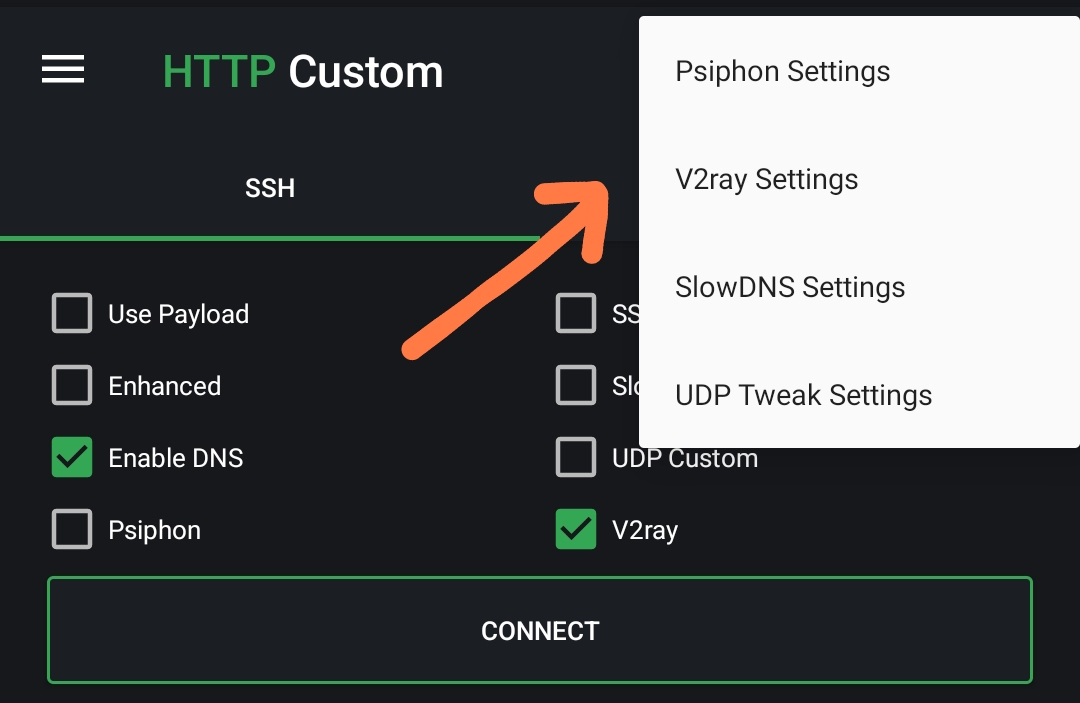
Available on Google Play Store
Setup via v2rayN (Windows)
- Download the latest v2rayN core.
- Import your unique configuration URL from Diden Store.
- Select Global Mode or PAC Mode and click Start.
Important Disclaimer
SSH and V2Ray/XRAY services from Diden Store are provided solely for data security, online privacy, and educational purposes. We strictly prohibit the use of our services for any illegal activities, including but not limited to hacking, distribution of prohibited content, or any actions that violate national laws. Users are fully responsible for all activities conducted using their purchased accounts.