In the modern digital landscape, Artificial Intelligence (AI) has integrated into every facet of our lives. From coding assistants to customer service bots, we share vast amounts of information with these intelligent systems every day. However, this convenience brings a critical concern: What happens to our data? As companies hunt for massive datasets to train their models, owning a Virtual Private Server (VPS) has become the gold standard for maintaining digital privacy and security.
The Hidden Risks of Public AI Interaction
Every time you prompt a public AI, your data is sent to a central server. This data is often logged and utilized for "Reinforcement Learning from Human Feedback" (RLHF). While this makes the AI smarter, it poses a significant risk to personal and corporate secrets. Once a sensitive snippet of code or a private thought is ingested by an AI model, it becomes part of a permanent digital footprint that you no longer control.
VPS: Your Private Shield Against Data Harvesting
By using a VPS, you move from a "Shared Economy" to a "Private Infrastructure." A VPS gives you an isolated environment where you decide the rules. When you set up your own AI bot or database via SSH (Secure Shell), the interaction remains between your local machine and your private server. This is known as Data Sovereignty—the right to have absolute control over your own digital assets.
Why Privacy-Conscious Users Choose VPS:
- Isolated Resource Allocation: Unlike shared hosting, your RAM and CPU are yours alone, ensuring no "neighbor" can peak into your processes.
- Full Root Access: You can install encryption tools and custom firewalls that public providers might not offer.
- Self-Hosted Models: With the rise of local LLMs like Llama 3, you can run an entire AI brain inside your VPS, ensuring 0% data leakage to external parties.
The Crawler Dilemma: Balancing Privacy and SEO
Webmasters today face a tough choice: allow AI crawlers to read their sites and risk having their content "stolen" for training, or block them and risk losing visibility. Using tools like Cloudflare AI Crawler blocking is an excellent first step, but it requires careful tuning.
Aggressive blocking can sometimes accidentally flag Google's search crawlers as threats. If Google cannot index your site, your articles will not appear in search results, directly impacting your traffic and revenue. The solution lies in a surgical approach—blocking unauthorized scrapers while keeping the door open for legitimate search engine bots.
Privacy vs. Visibility
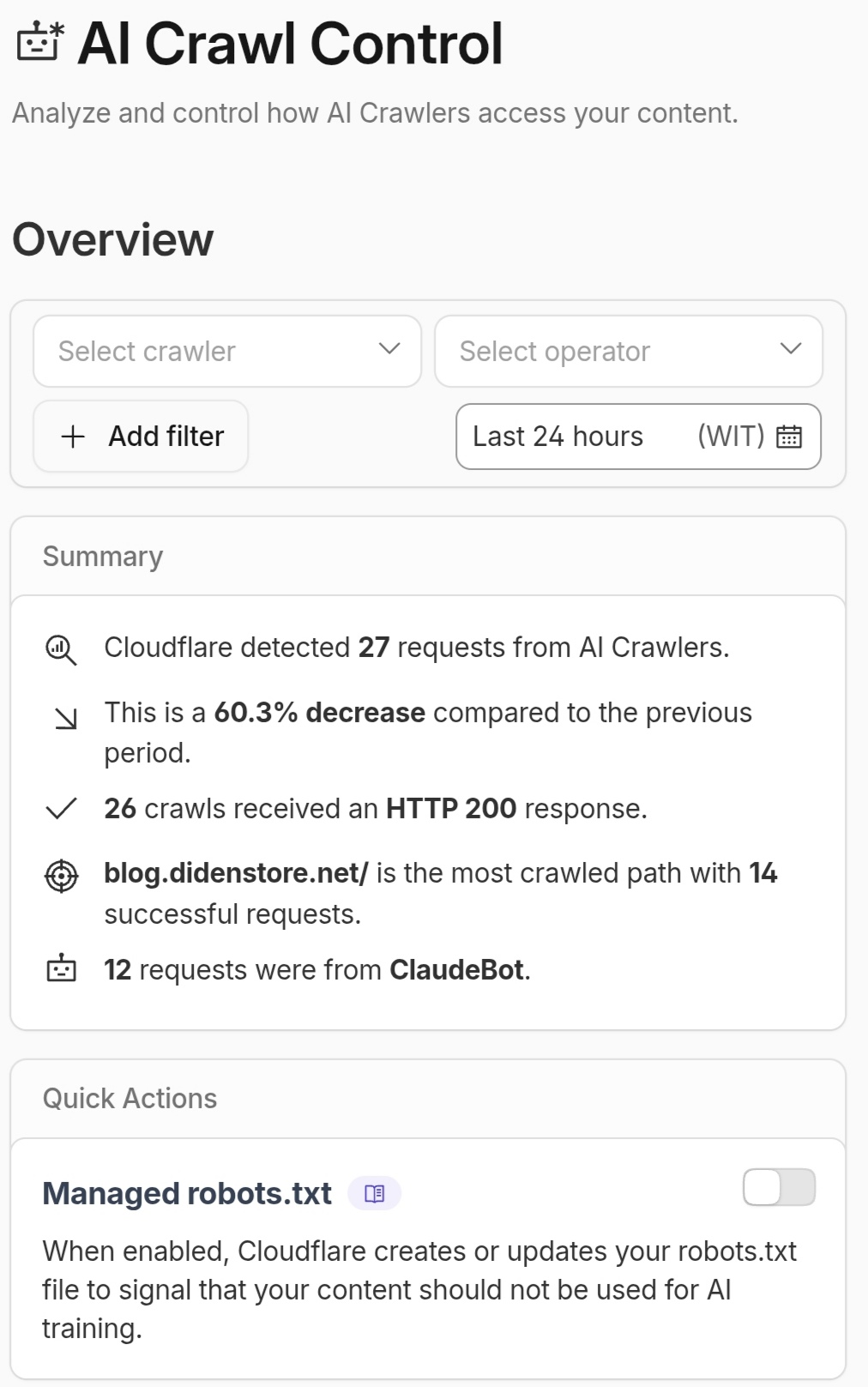
Figure: Data from Cloudflare's AI Crawl Control showing various AI bots (like ClaudeBot) attempting to access site content.
As shown in the dashboard above, AI crawlers are constantly active. In this example, Cloudflare detected dozens of requests, with ClaudeBot being one of the most frequent visitors. This visual evidence highlights why site owners must take proactive steps to manage how their data is consumed by AI entities
Comparison: Public SaaS vs. Self-Hosted VPS
| Comparison Factor | Public SaaS / Shared Hosting | Self-Hosted VPS |
|---|---|---|
| Data Ownership | Limited (Owned by Provider) | Full (Data Sovereignty) |
| Security Protocols | Generic / Standard | Custom (SSH Keys, MFA) |
| AI Training | Often used for training | Strictly Private |
| Accessibility | Easy (No setup) | Advanced (Requires SSH login) |
| Scalability | Restricted by Plan | Highly Flexible |
Securing Your Login: The SSH Priority
Managing a VPS for AI projects requires a secure gateway. SSH remains the most trusted method for remote administration. However, using the default port 22 and simple passwords makes your server a target for brute-force attacks. True privacy in the AI era starts with a hardened SSH configuration—disabling password logins and switching exclusively to SSH Key-based authentication.
FAQ: Common Security & Privacy Questions
Q1: Can an AI assistant "hack" my VPS if I provide an IP?
A1: An IP address alone is not enough to compromise a server. The real risk lies in sharing login credentials.
Q2: Should I hide my website from AI bots completely?
A2: Only if you don't care about SEO. To stay on Google, you must allow Googlebot.
Q3: Is VPS better than Cloud Hosting for AI?
A3: Yes, because VPS gives you "Root Access" to install custom AI libraries.
This article is provided strictly for educational and informational purposes. Important: The author is NOT affiliated with, sponsored by, or in partnership with any third-party services mentioned (such as Biznet Gio, Cloudflare, etc.).
All brand names or service logs used are for illustrative and educational context only. The implementation of SSH and VPS technology carries inherent risks; therefore, the author is not liable for any data loss, security breaches, or technical errors resulting from improper server management. Proceed with caution and at your own risk.