When configuring a V2Ray or Xray proxy server using the modern WebSocket + TLS (WSS) tunneling architecture, routing your traffic through a Content Delivery Network (CDN) has shifted from being a luxury to an absolute engineering necessity. In the sophisticated networking landscape of 2026, direct server-to-client connections are increasingly susceptible to packet inspection, deep packet analysis (DPI), and strategic IP blacklisting by commercial Internet Service Providers (ISPs). Implementing an intermediary edge network effectively shields your origin infrastructure, masks your backend Virtual Private Server (VPS) IP identity, and enhances the operational resilience of your proxy network under strict traffic-filtering environments.
Two global infrastructure giants dominate this specific use case: Cloudflare and Amazon CloudFront. Cloudflare has long been heralded by casual developers and privacy enthusiasts for its generous, unmetered zero-cost utility tier. On the other side of the spectrum, Amazon CloudFront—backed by the expansive Amazon Web Services (AWS) ecosystem—presents a hyper-optimized, production-grade network architecture tailored for enterprise delivery. If you are a network administrator or server operator aiming for peak data throughput, minimal latency, and zero connection dropouts, choosing between these two infrastructures requires a deep understanding of their backend behavior. This comprehensive architectural breakdown covers the structural differences, performance metrics, and configuration profiles required to build a resilient, high-speed proxy network.
Cloudflare vs Amazon CloudFront: Architectural Head-to-Head Comparison
Before unpacking the granular dashboard parameters, it is critical to evaluate how Cloudflare and Amazon CloudFront differentiate themselves on a macro level regarding transport protocols, network priority, and bandwidth constraints. While both platforms excel at delivering static web application payloads, their structural handling of persistent, long-lived stateful WebSocket streams varies drastically.
| Performance Metric | V2Ray / Xray on Cloudflare | V2Ray / Xray on Amazon CloudFront |
|---|---|---|
| Pricing Matrix & Costs | 100% Free Tier with zero data egress or bandwidth limitation constraints. | Pay-As-You-Go model. Free Tier caps at 1 TB/month of egress data. |
| Traffic Customization Granularity | Highly restricted on the Free Tier; relies on standardized global edge rules. | Exceptionally granular via custom Cache Behaviors, Policies, and TTLs. |
| Latency, Ping, & Jitter | Subject to visible routing congestion during localized peak internet hours. | Consistently low jitter; premium Anycast routing paths minimize overhead. |
| IP Scanning & Sni Availability | Extremely high availability with massive, publicly broad IP subnets. | Moderate availability; requires structured monitoring of specific AWS ranges. |
| WebSocket Lifecycle Support | Enabled by default on standard ports with broad traffic proxying. | Requires manual definition of Origin Headers and Cache Policies. |
| Global Server Edge Densities | Expansive consumer-facing anycast network localized in almost every country. | Dedicated enterprise tier backbone points of presence with optimized paths. |
Cloudflare is highly accessible, making it the default launchpad for individual hobbyists. Because its free plan does not charge for data usage, millions of generic proxy networks run through its shared IP addresses. However, this high volume creates a noisy-neighbor effect. During peak usage hours, consumer traffic often faces throttling or increased latency. Amazon CloudFront avoids this issue by separating workloads. Its infrastructure gives every payload dedicated resources, preventing performance dips during high-traffic windows.
Decoding AWS CloudFront Cache Behaviors for V2Ray
To implement an optimized proxy tunnel through Amazon Web Services, you must understand CloudFront's Cache Behaviors [3]. Unlike standard web deployment scenarios where edge networks store static images or HTML files to speed up page loads, proxy applications require a transparent, real-time bidirectional data conduit. Below is a deep, step-by-step breakdown of how to configure an AWS CloudFront distribution to maintain stable, persistent WebSocket data streams without triggering backend connection timeouts.
1. Path Patterns and Upstream Backend Mapping
The entry point of your CloudFront distribution behavior relies entirely on explicit routing strings. A standard configuration employs a highly customized, unpredictable URL path pattern rather than a generic wildcard statement. For instance, configuring a strict string path such as /vmess-cloudfront-premium-telegram-diden09 serves two essential technical purposes.
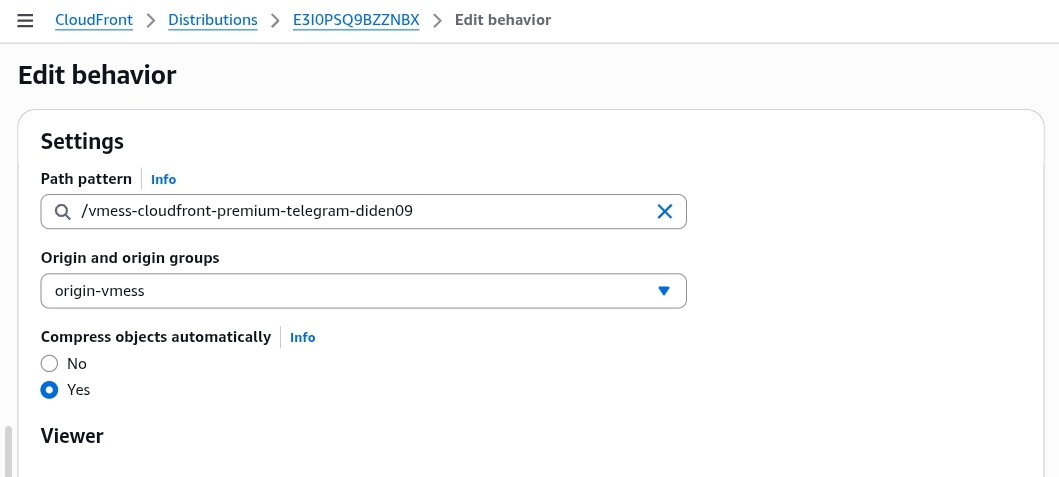
First, it acts as an invisible network filter. CloudFront will only intercept, process, and execute the backend forwarding rules if an incoming client connection requests this precise directory string. Any automated malicious network scanning, random bot probes, or standard HTTP web requests hitting alternative paths will be automatically rejected or directed to a separate web directory. This conceals your proxy tunnel from suspicious observers. Second, this path links directly to your configured Origin Group (labeled here as origin-vmess), ensuring your encrypted traffic flows smoothly to your Virtual Private Server's network stack without unnecessary processing delays.
2. Viewer Protocol Policies and HTTP Method Allowances
Managing the interaction between the client device and the CloudFront edge network determines the overall success rate of your proxy tunnel. The Viewer Protocol Policy dictates how secure connections are handled. Choosing the HTTP and HTTPS parameter offers optimal flexibility when configuring advanced client-side SNI (Server Name Indication) masking or routing traffic through specific network pathways.
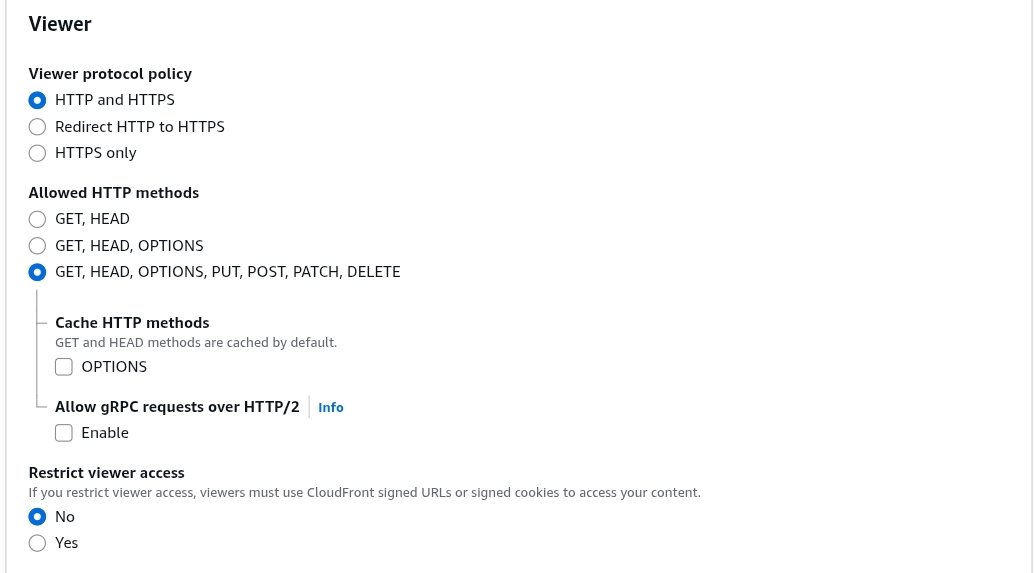
The choice of Allowed HTTP Methods is equally vital. While regular web servers mostly use GET and HEAD requests to load static text and images, proxy protocols like V2Ray or Xray require full access to all HTTP methods: GET, HEAD, OPTIONS, PUT, POST, PATCH, DELETE. The initial WebSocket connection starts as a standard HTTP upgrade request. This request relies on dynamic, write-heavy HTTP headers to establish a persistent session. If your CDN blocks or filters out advanced methods like OPTIONS or POST, your client application will fail to complete its handshake, resulting in immediate connection errors.
3. Eliminating the Cache Key Bottleneck for Real-Time Streams
Bypassing standard proxy optimization features is essential for setting up proxy protocols within the AWS ecosystem. By adjusting the Legacy Cache Settings and explicitly switching Header and Query String forwarding parameters to All, you consciously disable CloudFront's data-caching capabilities for that specific path behavior.
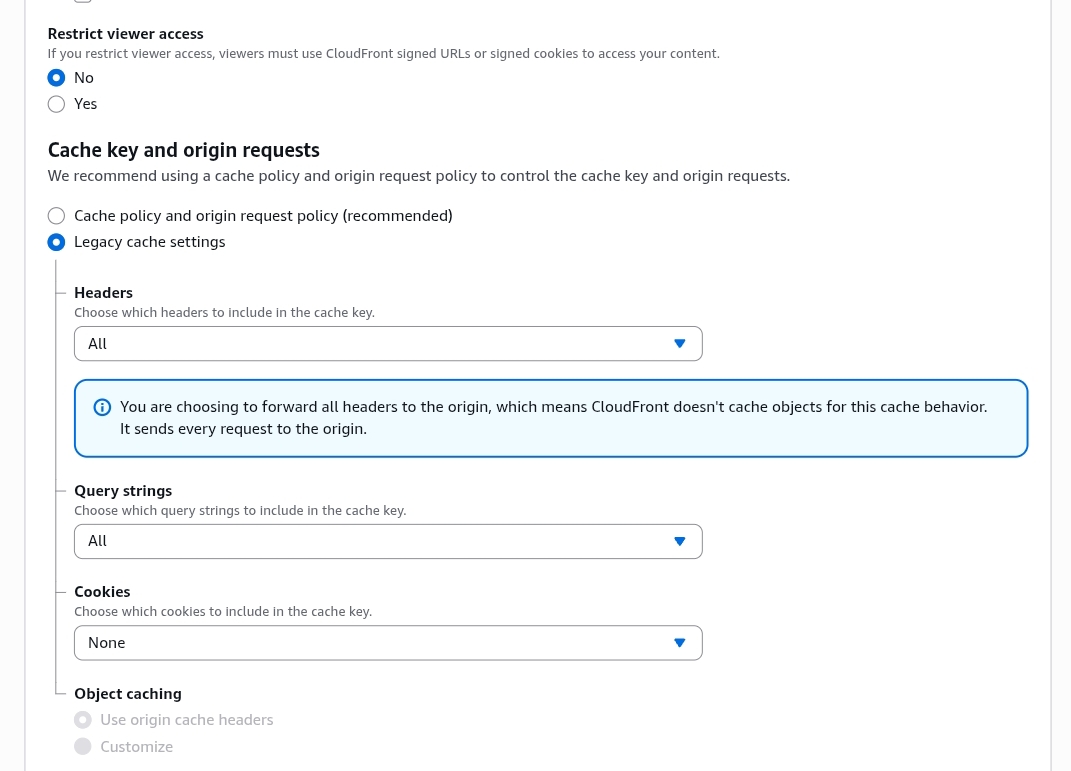
AWS will display a warning noting that selecting this option stops CloudFront from saving assets at the edge, forcing it to forward every request directly to the origin server. For a proxy network, this is exactly what you want. Proxy packets carry dynamic, real-time data streams that change every millisecond. If the CDN attempts to cache these unique data packets, it will break the tunnel's continuity. Disabling the cache ensures that all encrypted traffic passes through the edge server instantly and unaltered, preventing packet drops and maintaining an active connection.
Optimizing the Origin Server Settings for Lower Latency
Routing traffic across the edge network is only half of the equation. The backend connection—the link extending from the CloudFront edge node to your actual origin VPS—must be fully optimized to maintain low latency and prevent server overhead.
1. Custom Domain Resolution and Port Masking
The Origin Domain configuration directs traffic to a clean DNS endpoint, such as origin v2ray didenstore.net, which points directly to your destination VPS IP address. When setting up the origin connection protocol, choosing HTTP Only is often the most efficient option. Because the front-facing connection from the client device to CloudFront is already wrapped in a secure TLS layer on port 443, adding a second layer of TLS encryption between CloudFront and your VPS is unnecessary. Skipping this step reduces CPU overhead on your origin server, allowing it to process active connections faster.
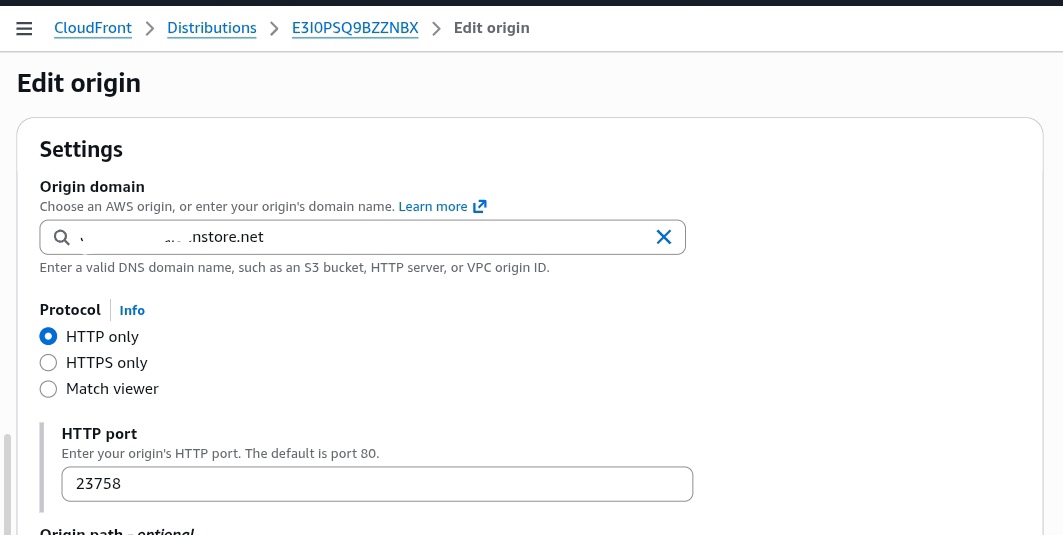
Additionally, shifting your HTTP Port away from the standard port 80 to a custom port like 23758 provides excellent obfuscation. Automated internet scanners constantly monitor common ports like 80, 443, 8080, and 8888 for proxy signatures. Moving your configuration to a unique, custom port keeps your backend hidden, reducing corporate scanning attempts and protecting your infrastructure from unauthorized access.
2. Disabling Redundant AWS Edge Infrastructure Features
Advanced enterprise mechanisms like Origin Shield and Mutual TLS (mTLS) should be turned off for proxy tunneling workloads. Origin Shield adds an extra caching layer to protect high-traffic websites from sudden visitor spikes, but for a real-time proxy tunnel, this extra hop only adds routing latency and increases your ping times.
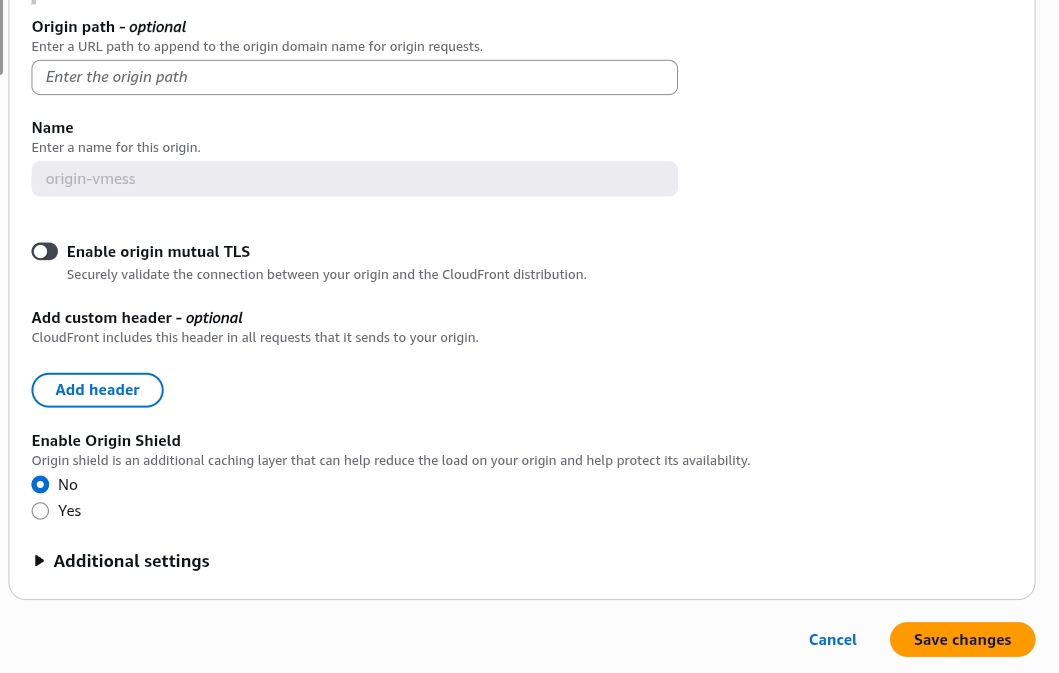
Similarly, Mutual TLS requires intensive cryptographic checks to verify certificates on both sides of the connection. For an asymmetric proxy setup, this creates unnecessary processing delays. Disabling these options streamlines your data path, ensuring a direct, low-latency connection between CloudFront's edge nodes and your origin VPS.
Conclusion: Determining the Definitive CDN Infrastructure
Choosing between Cloudflare and Amazon CloudFront ultimately depends on your budget, traffic volume, and technical requirements:
- Choose Cloudflare if you want a straightforward, cost-effective solution with unlimited bandwidth. Its free tier is ideal for standard daily browsing, streaming, and open-source deployments that do not require complex configuration.
- Choose Amazon CloudFront if you need rock-solid stability, minimal packet loss, and premium routing paths that remain fast during peak traffic hours. It is the best choice for production environments where low latency and reliable uptime are critical.
Frequently Asked Questions (FAQ)
Can I integrate modern Xray-core protocols with Cloudflare and CloudFront?
Yes. Both networks support WebSocket transport layers, making them fully compatible with modern Xray-core features like VLESS and XTLS configurations.
Why does Cloudflare show higher latency spikes compared to CloudFront?
Cloudflare's free routing tier handles a massive volume of global traffic, which can lead to congestion during peak hours. CloudFront avoids this by isolating its routing lanes, delivering more consistent speeds.
Are there hidden costs when running a proxy over Amazon CloudFront?
CloudFront includes a standard free tier providing up to 1 TB of outbound data egress per month. Once this threshold is exceeded, standard pay-as-you-go bandwidth fees apply.
Disclaimer
Disclaimer: This article is intended strictly for educational, network diagnostics, and academic research purposes. The configurations described demonstrate advanced content delivery network behaviors and standard reverse-proxy architectures. Readers are solely responsible for ensuring compliance with local legislation, regional telecom policies, and third-party platform service agreements.