Have you ever spent an evening digging through your websites raw server access logs? For most casual bloggers, opening a massive text file filled with thousands of rapidly scrolling strings of data can be an intimidating, if not entirely confusing, experience. At first glance, it looks like an incomprehensible wall of IP addresses, timestamps, and arcane system strings. However, if you slow down and dissect these lines piece by piece, you quickly realize that your server log is essentially the "black box" of your digital airspace. It documents the precise footprint of every single automated visitor, crawler, and background process interacting with your web asset.
In this technical case study, we are going to open up the hood and take a look at real-world server logs from my own platform. We will explore how commercial SEO crawlers navigate our pages, unravel the mysteries behind strange framework scan errors, and get to know the automated digital watchmen that quietly index the structural security parameters of the web. More importantly, we will understand how to view these interactions not as digital noise, but as a practical checklist for optimization.
Log Metrics: Server Request Density Chart
To provide a clearer picture of the baseline data collected from our terminal diagnostics, below is a structural breakdown of the request volume distribution generated by various automated agents hitting our endpoints over a standard 48-hour monitoring cycle:
Relative Automated Hit Frequency Pattern
*Data normalized to represent cyclical hit patterns extracted across active text system logs.
1. When SEO Giants Attack: Understanding AhrefsBot and SemrushBot Activity
One of the most common reasons a webmaster experiences sudden anxiety when reading their server access files is the appearance of aggressive, recurring requests from entities named AhrefsBot or SemrushBot. It is easy to look at twenty or thirty requests coming from the same IP range within a matter of minutes and assume that your website is facing a malicious Layer 7 DDoS attempt or an uninhibited scraper script looking to steal your content. Fortunately, the reality of the situation is completely different, and quite frankly, highly encouraging.
What are these bots and what do they do?
AhrefsBot and SemrushBot are automated web crawlers operated by two of the world's leading search engine marketing and SEO analytics platforms (Ahrefs and Semrush). Their primary function is to continuously scour the entire public internet to map out how websites link to one another, record backlink profiles, monitor domain authority changes, and track keyword rankings. Instead of destroying a website, their main job is to collect marketing intelligence so that website owners can see their digital growth and competitive positioning.
Interestingly, if you maintain a dynamic infrastructural setup—such as hosting your main content library on a specific subdomain while managing your root domain via custom cloud routing—you will notice a very clean behavior pattern from these commercial crawlers. Instead of hitting your front door and dealing with root-level URL redirection rules, they navigate directly to your asset files. This happens because commercial bots regularly monitor Google's active Search Engine Result Pages (SERPs). Once your subdomain links—such as your dynamic tutorial paths or operational file parameters—show up in search data, these scrapers go straight for the target.
When you look at your log entries and see these bots hitting specific operational endpoints like /baca.php?id=5 or localized guide pages, and your server responds with a clean HTTP 200 OK status code, it means your underlying architecture is performing exactly as intended. Your content delivery systems are serving data seamlessly without triggering loops, execution errors, or server-side bottlenecks.
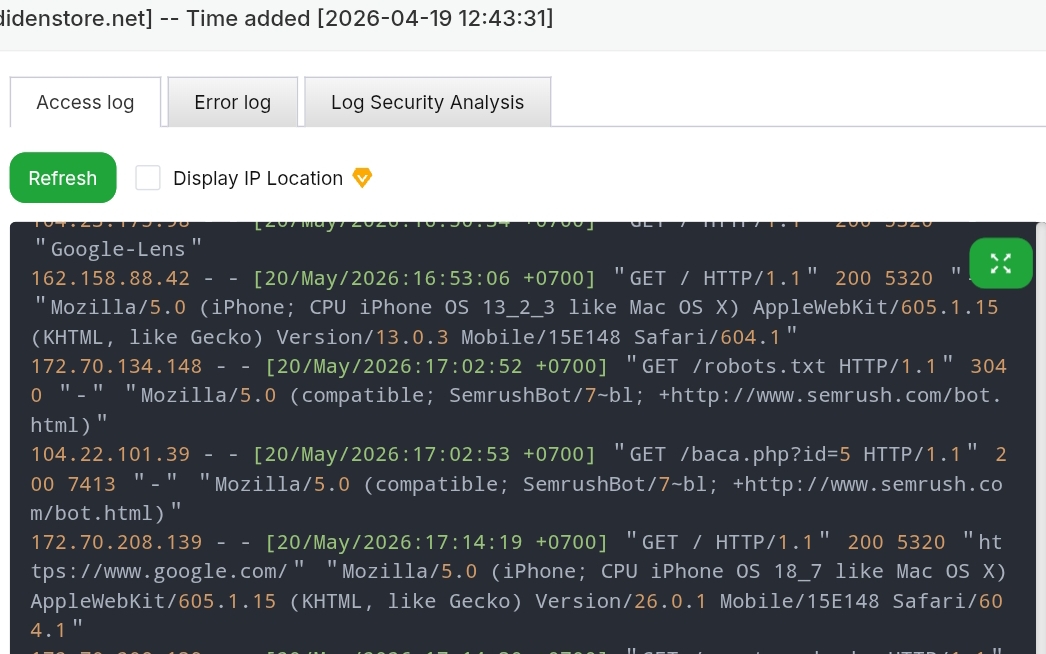
Figure 1: Authentic server log entries showing SemrushBot successfully requesting localized technical articles and system configurations with an HTTP 200 OK server response.
2. Unmasking the 404 Ghost Errors: The Mystery of Framework Directory Probing
As you spend more time reviewing your Nginx or Apache system error logs, you will inevitably come across an array of red text lines detailing structural faults. The logs will scream something like [error] ... No such file or directory, targeted at paths that you, as the creator of the website, know for a fact do not exist on your machine. You will see automated external systems attempting to push POST and GET requests into directories named /_next, /api/route, or /app. If your website is written entirely in native, efficient PHP scripts, you might pause and wonder: Why on earth are external systems hunting down Next.js, React, or Node.js backend folders on my server?
What are these scanning bots and what do they do?
These entries are generated by automated Vulnerability and Framework Scanners. Unlike search engine bots that crawl your text to index your articles, these malicious or gray-hat bots are programmed to hunt for system exploits. Their sole function is to cycle through millions of IP addresses blindly, testing standard folder structures used by modern web frameworks like Next.js or Laravel. They do this to locate misconfigured development files, unpatched API backdoors, or exposed environment files (like .env) that might allow them to compromise a web host or deploy unauthorized scripts.
When these scanners hit your custom PHP layout and try to force their way into a non-existent /_next directory, your system handles it exactly the way it should: it blocks the path, throws an internal 404 error, and logs the attempt. This is clean, safe background noise. It proves that your server is acting as an unyielding filter, rejecting arbitrary foreign directory requests while protecting your legitimate operational codebase. Juries like Google AdSense or Ezoic will never penalize your domain for these errors; they recognize them as standard proof of a functional, default firewall response.
3. Meet CensysInspect: The Global Security Watchman on Your Subdomain
Alongside commercial SEO bots and framework scanners, another frequent guest in your daily traffic logs is a user-agent named CensysInspect. Unlike marketing bots that count your keywords or malicious probes trying to find an open configuration loophole, Censys operates in the realm of global infrastructure transparency.
What is this bot and what does it do?
CensysInspect is an official information security crawler operated by Censys, a highly respected cyber security platform used by corporate tech teams and researchers worldwide. The primary function of this bot is to conduct internet-wide structural sweeps to map out every single active public IP address on Earth. It acts as an automated internet surveyor, cataloging open network ports, verifying SSL/TLS certificate validity, identifying operating system signatures, and checking for corporate exposure risks to ensure that the foundational routing of the web remains accounted for and secure.
In our log output, we can observe this bot repeatedly requesting core asset files, site icons, and validation paths like /images/icondidenstore.svg. It does this to verify host consistency and assess whether your delivery endpoint is properly configured. Is this crawler dangerous? Absolutely not. Censys is a legitimate, defensive security tool. When it drops by your domain, it simply takes a technical snapshot of your public-facing architecture and moves on. It does not look to scrape your written guides, nor does it strain your web server’s structural resources.
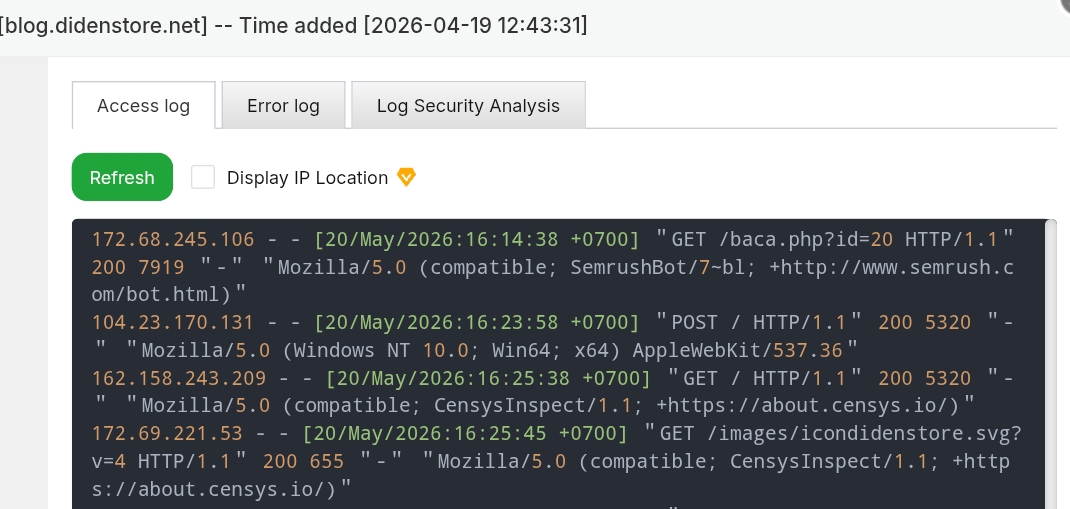
Figure 2: Active log stream illustrating repetitive security inspections by CensysInspect checking directory paths and static image vectors.
4. Alternative Platforms: How to Check Web Logs on WordPress and Shared Hosting
While managing raw text streams via Linux commands is ideal for VPS owners, a significant portion of webmasters run their businesses on managed environments like WordPress or shared cPanel networks. These platforms abstract away terminal root access to maintain system safety, meaning you cannot execute automated terminal searches. Fortunately, you can still easily inspect your bot traffic patterns using alternative, consumer-friendly vectors.
Checking Server Traffic Patterns via cPanel Layouts
If your platform is hosted under a shared provider framework utilizing the cPanel control matrix, you can track visitor signatures without coding. Log into your primary host interface, navigate downstream to the dedicated Metrics module group, and look for an application named Visitors or Raw Access Logs. Here, you can instantly download zipped text snapshots of your incoming HTTP transactions or view live graphical breakdowns of exactly which search engines or regional scanners are querying your asset blocks.
Monitoring Bot Logs Internally via WordPress Plugins
For independent WordPress penmen who prefer checking everything directly inside their site dashboard, you can deploy lightweight diagnostic extensions. Tools like WP Security Audit Log, User Activity Log, or security suites like Wordfence maintain continuous internal software-level trackers. These systems print clean, chronological access entries directly onto your control panel, mapping out user-agents like AhrefsBot or CensysInspect alongside their corresponding server response codes right as they strike your layout.
5. Pro-Tip: Advanced Log Filtering via Linux Terminal Commands
If you are managing your own virtual private server (VPS) or dedicated web host through an administration panel like aaPanel or CyberPanel, logging into a visual file manager just to download and read a text log file is highly inefficient. When your traffic grows, log files can easily swell to several gigabytes in size, rendering traditional text editors completely useless. Instead of struggling with heavy visual tools, we can leverage the native speed of the Linux command line interface.
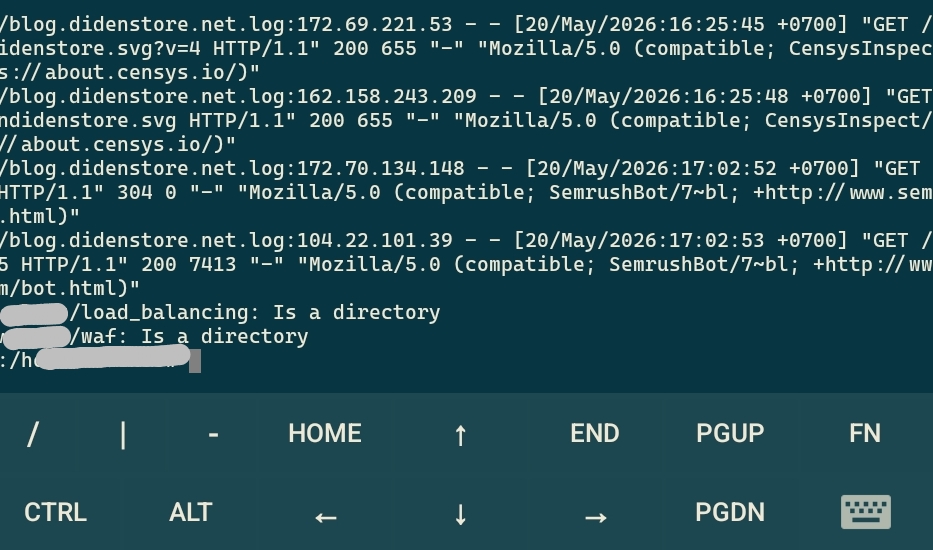
By using the extended global regular expressions print command (egrep), we can extract valuable insights from our log directory in milliseconds. However, there is a common pitfall: many server control panels save their access history into clean, extensionless text files rather than standardized .log formats. If you try to run an explicit file search against an extension that doesn't exist, your terminal will return an error. To circumvent this, we use the wildcard asterisk character (*) to force the operating system to scan every single data block inside our logging folder. Here is the exact, fail-proof process to isolate our target bots:
root@username:/home/username# sudo su
root@username:/home/username# cd /www/wwwlogs
root@username:/www/wwwlogs# sudo egrep -i "CensysInspect|Ahrefs|semrush" *
By executing the commands above, you instruct your Linux kernel to enter the core log directory, bypass file type restrictions, and scan every line of raw data for the string matches of "CensysInspect", "Ahrefs", or "Semrush". The addition of the -i flag ensures that the query remains completely case-insensitive, successfully matching any variation of upper or lowercase letters used by the incoming user-agents.
Frequently Asked Questions (FAQ)
Q1: Why do SEO bots like AhrefsBot and SemrushBot access my subdomain directly instead of the root domain?
Answer: SEO crawlers look at Google's actual search result pages (SERPs). Once your subdomains and internal links are indexed via Google Search Console, these commercial crawlers bypass your root domain's routing entirely and hit your asset files directly to map backlinks and keywords.
Q2: Are automated 404 errors for paths like /_next or /api dangerous for my PHP website?
Answer: No, they are completely harmless. These errors are caused by automated vulnerability scanners attempting to guess your websites underlying framework. Since your platform runs on native PHP, your Nginx/Apache server rightfully returns a 404 Not Found response, which actually proves your server security configuration is solid.
Q3: What is CensysInspect and should I block its IP address from my server?
Answer: CensysInspect is a legitimate internet security scanner that gathers technical data such as SSL certificates and open ports for global cyber security research. It is categorized as a good bot and does not pose a threat to your database or content, so blocking it is generally unnecessary.
Q4: How do I filter out specific bots from raw server log text files without extensions using Linux Terminal?
Answer: You can navigate to your log directory using 'cd /www/wwwlogs' and execute a multi-keyword filter command like 'sudo egrep -i "CensysInspect|Ahrefs|semrush" *'. The wildcard asterisk character ensures the terminal reads every text file regardless of its file extension name.
Conclusion
At the end of the day, monitoring your websites internal server logs is an essential practice that ensures your backend architecture remains fully optimized for both global search engines and digital monetization networks. As webmasters, our objective should never be to maintain a pristine, error-free log sheet. The internet is naturally chaotic, and automated framework probing or security checking is an unavoidable reality of keeping an asset online. Instead, our true focus must remain on ensuring that legitimate, high-priority crawlers—such as Google, Ezoic, and major search utilities—receive an unhindered, green-lit pathway into our core content. When your infrastructure treats these bots to seamless, lightning-fast responses, your website stands fully prepared to succeed across the competitive digital landscape.
Disclaimer
The information and technical procedures described in this article are based on real-world case studies and personal server administration experiences for educational purposes only. Modifying server logging parameters, execution privileges, or altering system firewalls via root terminal commands carries inherent operational risks. The author assumes no liability or responsibility for any direct or indirect technical system malfunctions, data corruption, or configuration errors that may arise from applying the command-line scripts or architectural adjustments discussed within this publication. Always ensure you have created verified system backups prior to modifying production server environments.